

Most AI tools hand you instructions and leave the work to you. Claude Code opens your files, writes the code, runs it, and shows you what it did, for $20 a month.
Claude Code: The AI That Cuts Web Development Time Without Writing Code
Claude Code builds the site, writes the code, and runs it for you, all for $20 a month, though it still needs a human to finish the job.
Recommendations reflect the recommender's genuine experience. Community members may earn giveaway entries for participating.
Top Recommends(123) 456-7890
View Profile Featured business

Top Recommends
Community Media · Bradenton
In this article
- What Claude Code is
- How Is It Different From ChatGPT or Other AI Chatbots
- What Makes Claude Code Work
- What Does Claude Code Cost
- What you can build
- 1. A Working Landing Page in Under an Hour
- 2. A Contact Form That Sends to Your Inbox
- 3. A Simple Automation Workflow
- 4. A Custom WordPress Block
- 5. A Spreadsheet Export From a Database
- What it can
- It's Still a Developer Tool
- The Output Needs a Human, Every Time
- It Has No Design Judgment
- It Can't Connect to Everything
- How it compares
- Is it worth setting up
That shift matters. Ask a chatbot for a booking form and you get a block of code to copy. Ask Claude Code and it puts the form in your site, connects it, and runs it to make sure it works. For businesses that have avoided hiring developers because the cost didn't make sense, this is the first tool that bridges the gap between needing something built and being able to afford to build it.
Here's what it is, what it costs, what it can build, and where it breaks.
What Is Claude Code?
Claude Code is an AI tool from Anthropic that generates working code and executes it inside your project. It is not a chatbot. It is a development environment that writes files, edits them, runs them, and shows you the output.
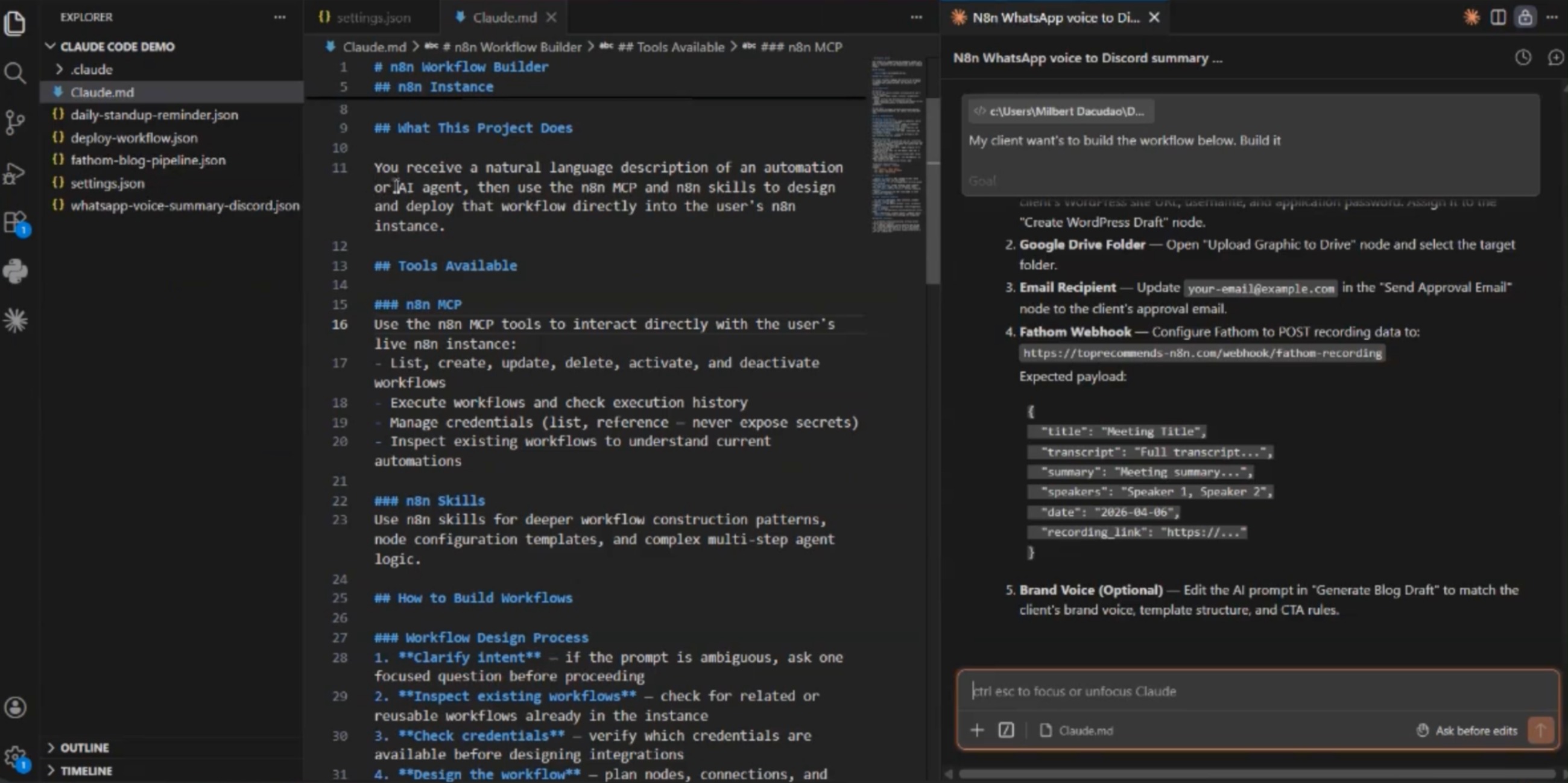
Released as a feature inside Claude Pro in late 2024, it runs in something called the terminal, which is the plain text window developers type commands into instead of clicking buttons. You give it a prompt. It writes the code. It runs the code. It shows you what it built.
How Is It Different From ChatGPT or Other AI Chatbots?
ChatGPT and most other AI tools generate text. You ask for code, they write it, you copy it, you paste it into your own files, and you figure out how to make it run. Claude Code skips that. It opens your project, writes the files directly, runs them, and debugs them when they break.
That makes it closer to a junior developer than a research assistant. It does not just explain what to build. It builds it.
What Makes Claude Code Work?
Claude Code uses MCP, which stands for Model Context Protocol, an open standard Anthropic released in 2024 so AI tools could connect to other software. Without it, an AI can only talk about your CRM. With it, the AI can log in and do things in your CRM.
MCP is what allows Claude Code to open files, edit them, save them, and run them without you copying and pasting between windows. The tool reads your project structure, writes new files where they belong, and executes commands the same way a developer would.
What Does Claude Code Cost?
Claude Code is bundled with Claude Pro, which costs $20 per month. There is no free tier and no separate fee for the code feature. You subscribe to Claude Pro and the code environment is included.
That pricing puts it in reach for most small businesses. Twenty dollars a month is less than an hour of contract developer time, and the tool does not bill hourly. You can test it, break it, and rebuild with it without watching a meter run.
What Can a Business Actually Build With Claude Code?
These examples come from documented use cases and firsthand testing. Each one names what the tool built, how it works, and what it replaces.
1. A Working Landing Page in Under an Hour
Claude Code can generate a complete landing page from a written description. You describe the layout, the sections, the call to action, and the branding. It writes the HTML, the CSS, and the JavaScript. It runs a local server so you can preview it in a browser. It revises sections when you ask.
This replaces hiring a designer for the first draft or spending hours in a page builder. The output is clean, semantic code that a developer can hand off or a business owner can host on any platform that accepts HTML.
2. A Contact Form That Sends to Your Inbox
Describe the form fields you need and where the submission should go. Claude Code writes the form, connects it to an email service or a webhook, and tests it to confirm the message reaches your inbox. It handles validation, error messages, and thank-you pages.
This eliminates the gap between needing a form and figuring out how to wire one up. For businesses running on static sites or platforms without native form builders, this is the fastest route from idea to working input.
3. A Simple Automation Workflow
Claude Code can draft workflows for tools like n8n, an open-source automation platform. Describe the trigger and the action. It writes the JSON configuration, tests the connection, and shows you the output. One tested example: an alert sent to Slack when a client emails the word urgent.
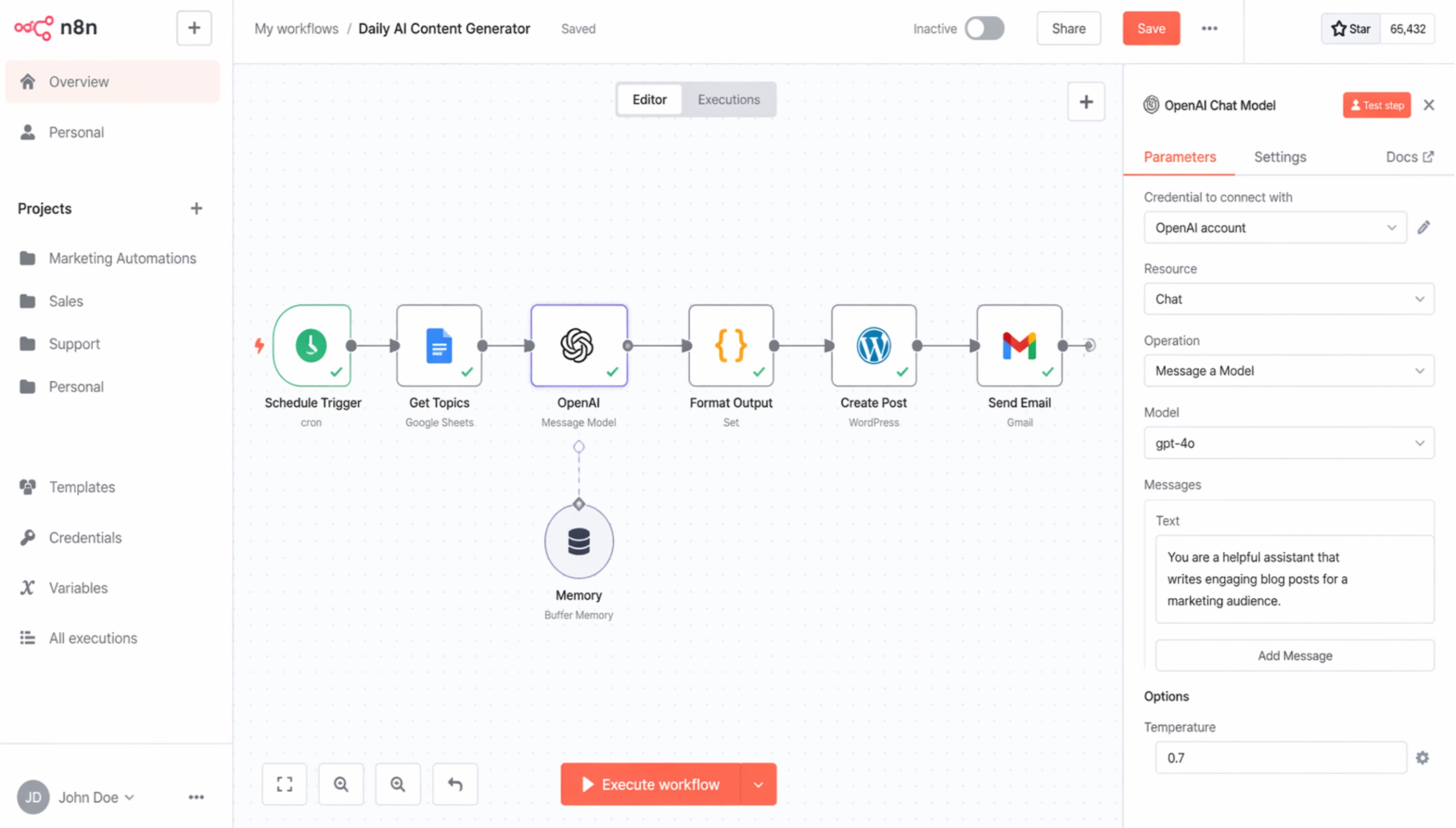
This replaces the trial and error most people go through when setting up their first automation. The workflow still needs to be reviewed and turned on by a human, but the setup is done.
4. A Custom WordPress Block
If you run WordPress, Claude Code can write a custom Gutenberg block. Describe what the block should display and how it should behave. The tool writes the PHP, the JavaScript, and the block registration code. It packages the block so you can upload it to your site.
This is useful for businesses that need a specific layout or feature their theme does not include. The block integrates with the native editor, so no page builder is required.
5. A Spreadsheet Export From a Database
Claude Code can pull data from a connected source, format it, and export it to CSV or Excel. Describe the columns you need and any filtering rules. The tool writes the query, runs it, and generates the file.
This replaces manual data pulls or paying a developer to write a one-off script. For businesses that need regular exports but do not have database access or SQL knowledge, this closes the loop.
What Can't Claude Code Do?
Most coverage of this tool lists what it built. Here's what the documentation admits and what firsthand testing exposed.
It's Still a Developer Tool
Claude Code requires comfort with file structures, command-line interfaces, and reading error messages. You do not need to write code, but you do need to understand what code is doing well enough to spot a mistake. If no one on your team has ever opened a terminal or reviewed a pull request, this tool will not change that.
The workflow assumes you can navigate folders, recognize file types, and troubleshoot when something does not run. That baseline is lower than writing code from scratch, but it is not zero.
The Output Needs a Human, Every Time
Claude Code writes code that works most of the time, but not all of the time. The model still makes mistakes. It generates deprecated syntax, misreads project dependencies, and occasionally writes logic that passes a test but fails in production.
Every output needs a technical reviewer before it goes live. That can be an in-house developer, a contractor, or a technically literate business owner, but it cannot be skipped. Publishing AI-generated code without review is publishing unverified work.
It Has No Design Judgment
Claude Code builds what you describe, but it does not know what looks good or what works for your audience. It generates layouts, but it does not have taste. The design decisions still belong to a human.
If you ask for a landing page, you will get one. Whether it converts, whether it aligns with your brand, and whether the hierarchy makes sense are questions the tool cannot answer. Pair it with a designer or use it to draft the structure while a human handles the aesthetics.
It Can't Connect to Everything
MCP is new. Not every platform supports it yet. Claude Code can open files and run commands on your local machine, but connecting it to third-party services requires either an existing MCP integration or writing one yourself.
That means some workflows still require manual setup. The tool is strongest when working with open platforms, local files, and well-documented APIs. Closed ecosystems and proprietary software are harder to reach.
How Does Claude Code Compare to Alternatives?
Claude Code competes with tools like GitHub Copilot, which writes code inside an editor but does not execute it, and low-code platforms like Bubble, which let you build applications without writing code but lock you into their ecosystem.
GitHub Copilot is faster for developers who already write code daily. It suggests completions, generates functions, and stays out of the way. But it does not build or run anything. You still do that part.
Bubble and similar platforms are better for non-technical users who want to avoid code entirely, but they come with subscription fees, hosting costs, and export limitations. You build on their platform, and you stay on their platform.
Claude Code sits in the middle. It writes and runs code, so you get a finished output, but the code is yours. You can host it anywhere, hand it to a developer, or delete it and start over. For businesses that want to own their work and avoid vendor lock-in, that flexibility matters.
Is Claude Code Worth Setting Up?
A year ago, building a landing page, a form, or a workflow meant hiring a developer or learning to code. Claude Code collapses that gap. It does not eliminate the need for technical oversight, but it cuts the time from idea to working draft in half.
For businesses that have avoided development work because the cost or complexity did not make sense, this is the first tool that makes trying it reasonable. Twenty dollars a month, no contract, and you get to keep what you build. That shifts who can afford to test an idea.
Neighbors ask
You do not need to write code, but you do need to be comfortable with file structures, command-line interfaces, and reading error messages. Claude Code writes the code for you, but you still need to understand what it is doing well enough to review it and spot mistakes. If no one on your team has ever opened a terminal or worked with developers, this tool will have a learning curve.
Latest from the Newsroom

Share this story
Every share earns one giveaway entry.
Contact Top Recommends
Recommend someone
Know a business as good as Top Recommends?
Tell us who they are and why you trust them, and it could become their next feature story.
For business owners
Your business could be the next story we tell.
A written feature, a printed copy mailed to you to display, and a permanent spot in the directory.
Get featured
Free 15-minute interview.
More stories
All articles
Attractions & Entertainment · 3 min read
Oklahoma Slingshot Rentals Built a Three-Wheel Thrill Business in OKC

· 4 min read
Top Recommends Founder Craig Wallace Featured in VoyageTampa's Hidden Gems Series

Home Services · 5 min read
The H2O Heroes Brings Free Water Testing and Filtration to Sarasota and Beyond

Construction · 3 min read
Veteran Epoxy Solutions Installed More Than 100 Floors Across Tampa Bay

Dental Clinic · 3 min read
Renew Dental Loft Sees One Patient at a Time, Seven Days a Week

Photography · 3 min read
All Angles REM Built a Real Estate Media Business on One Guarantee

Art Gallery · 4 min read
Top Recommends Anna Maria Island: Alanna Kelly of Cove

Marketing · 3 min read
Kevin St John Built Businesses Before He Ever Coached One

AI & Tech · 7 min read
Why Local Businesses Are Losing Customers to AI Search And Don't Even Know It

Non-Profit · 3 min read
Top Recommends Pledges $50,000 to Mote Marine Laboratory & Aquarium